Guides/Updated October 30, 2026
Equirectangular vs cubemap: what's the difference, and how to convert
Both formats hold the same thing, a complete 360° × 180° view, laid out differently. Here's how each one works, where each is used, and how to convert between them without losing detail.
The short answer
- Equirectangular is one image, exactly twice as wide as it is tall. It's what 360° cameras save, what Facebook and most 360° viewers read, and the usual format for HDRI environment maps.
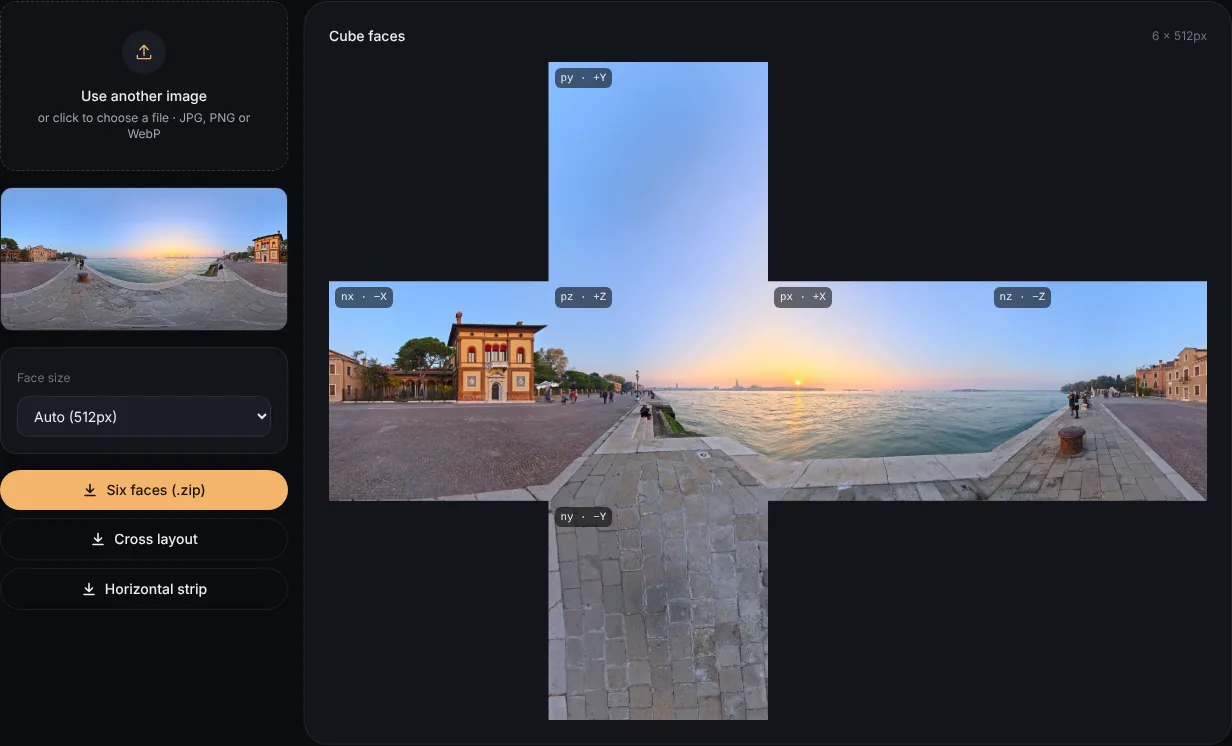
- A cubemap is six square images, one for each face of a cube around the camera. It's what many game engines and real-time renderers use for skyboxes and reflections.
- Converting between them is quick and, done at the right size, keeps nearly all the detail.
How an equirectangular panorama works
Imagine the sphere around you flattened like a world map. Each column of the image is a direction around you (360° from left to right) and each row is an angle up or down (180° from top to bottom), which is why the image is always 2:1. The left and right edges are the same direction, so a good panorama joins seamlessly when it's wrapped back into a sphere.
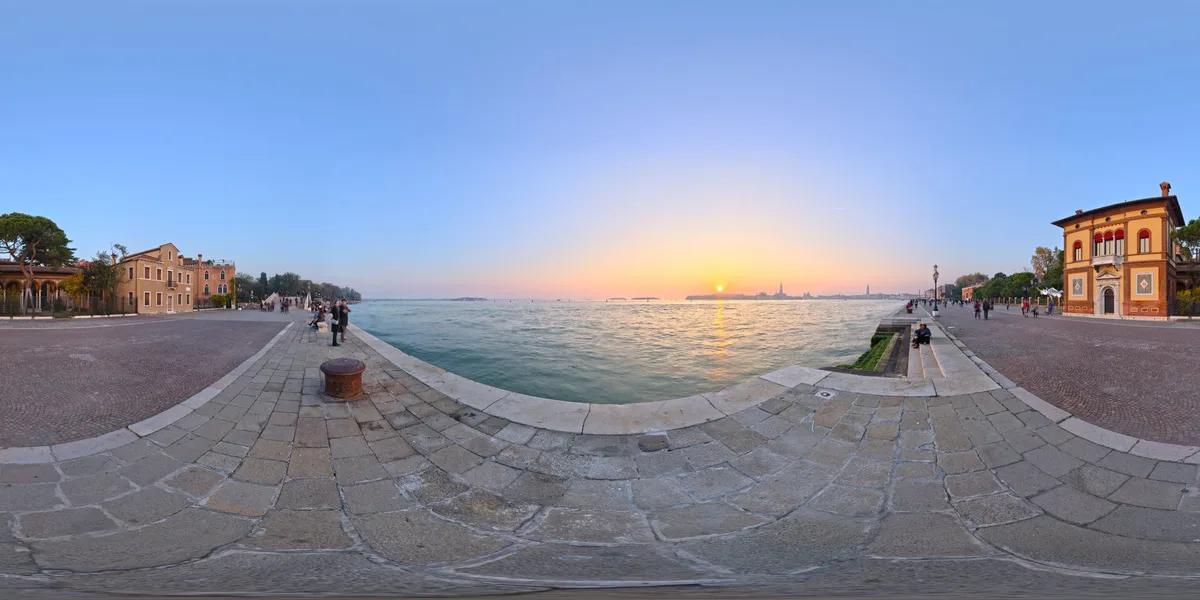
The catch is at the top and bottom. The whole top row of pixels is a single point straight up, stretched across the full width, so the sky and the ground look warped in the flat image and use far more pixels than they need. That's normal: a 360° viewer undoes the stretch when it wraps the image around you.
How a cubemap works
A cubemap puts the camera inside a cube and saves what it sees through each face: six square images with a 90° field of view each. Nothing is stretched, every pixel covers a similar slice of the view, and graphics cards can sample a cube texture directly, which is why real-time engines like the format.
The faces are usually named after the axis they face: px and nx (right and left, +X and −X), py and ny (up and down, +Y and −Y), pz and nz (+Z and −Z). This is the OpenGL convention that Three.js and many engines use. Cubemaps come in three common layouts:
- Six separate files, one per face.
- A cross: one 4 × 3 image with the faces unfolded around the front face.
- A strip: all six faces in a row (6 × 1) or a column (1 × 6).
Which one should you use?
- Viewing and sharing a 360° photo (360° viewers, Facebook, virtual tour software): equirectangular.
- HDRI lighting in Blender, Godot or Unreal: equirectangular. These tools take the 2:1 image directly; Unreal turns an imported equirectangular HDR into a cube texture for you.
- Skyboxes and reflections in a real-time engine: whichever the engine asks for. Unity can import either a single equirectangular image or a cubemap layout as a cube texture; Three.js has loaders for both; some older engines and tools only accept six faces.
- Editing: equirectangular is easier to keep as your master file, because it's one image. Convert to a cubemap at the end if you need one.
What size to choose
To keep all the detail, make each cube face a quarter of the panorama's width: a 2048 × 1024 panorama becomes six 512 × 512 faces, a 4096 × 2048 panorama six 1024 × 1024 faces. Going bigger only adds blur, because there's no extra detail to fill it. Six 512-pixel faces hold about 1.6 million pixels against 2.1 million in the 2048 × 1024 panorama, yet show the same detail, since the cubemap doesn't waste pixels on stretched poles.
How to convert an equirectangular panorama to a cubemap
- Open the Cubemap Generator and drop in your 2:1 panorama. It runs in your browser, so the image isn't uploaded.
- Leave Face size on Auto, which uses a quarter of the panorama width, or pick a smaller size for faster loading on the web.
- Download Six faces (.zip) for separate px, nx, py, ny, pz and nz files, Cross layout for one 4 × 3 image, or Horizontal strip for a 6 × 1 image.
How to convert a cubemap back to an equirectangular panorama
- Open Cubemap to Panorama.
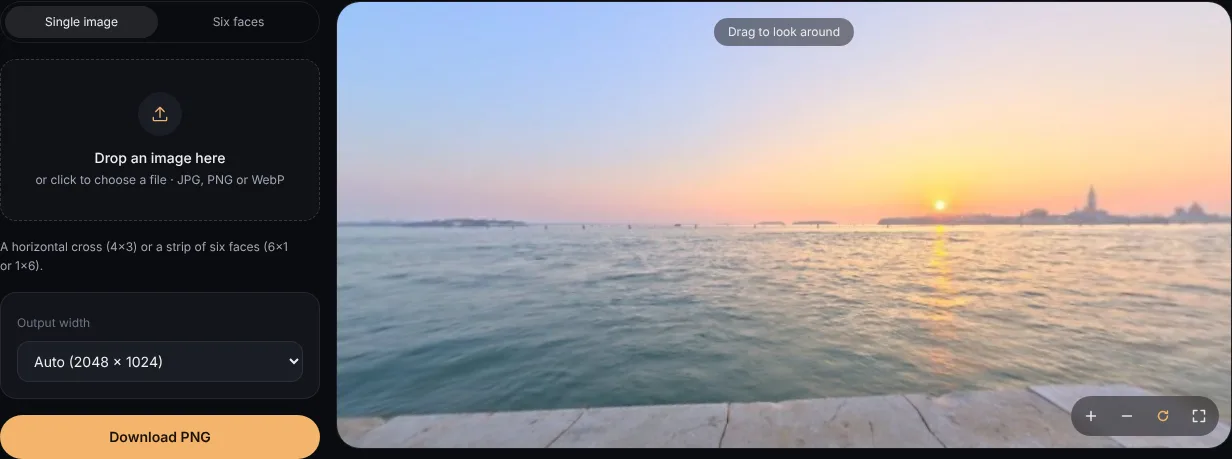
- Drop in a cross or strip image, or switch to Six faces and add one image per direction. Faces must be square and all the same size.
- Leave Output width on Auto (four times the face width), check the result in the 3D preview, then Download PNG.
How much quality does a conversion lose?
We converted the 2048 × 1024 Venice panorama to 512-pixel faces and back with the two tools, then compared the result with the original pixel by pixel. The average difference was about 2 levels out of 255 (a PSNR of 36 dB): the two look the same side by side, with a slight softening of fine texture such as the paving stones, which comes from resampling. Converting back and forth repeatedly adds up, so keep your original panorama and convert from it each time.
Common problems
- Faces rotated or mirrored in your engine. Engines don't all orient cube faces the same way. Our tools use the OpenGL / Three.js convention; if a face comes out rotated, rotate or swap that face, or import the equirectangular image instead if your engine accepts it.
- The panorama looks warped when you open it. That's the normal equirectangular stretch. Open it in a 360° viewer instead of a photo app.
- The input isn't 2:1. A regular wide panorama from a phone isn't a full sphere, so it can't be turned into a complete cubemap. Generate a full 360° from it with Photo to 360° first.
Need a panorama to start from? Describe a scene and the AI generator makes a 2:1 equirectangular panorama up to 4K, which you can then export as cube faces and an HDR from My panoramas.
Questions
Is a cubemap better quality than an equirectangular panorama?
Not by itself. A cubemap stores the view more evenly, so it needs fewer pixels for the same detail, but converting an existing panorama can't add detail that wasn't there. At a face size of a quarter of the panorama width, both show essentially the same image.
What does an HDRI file usually use?
Most HDRI environment maps, such as the ones on Poly Haven, are equirectangular .hdr or .exr files. Tools that need a cubemap convert them on import.
Is my image uploaded when I convert it?
No. Both converters run entirely in your browser.